
Question-and-Answer Resource for the Building Energy Modeling Community
 | 1 | initial version |
This is not a straight answer to your question. I simply ran a similar exercise on a variant of the US DOE Prototype Warehouse. Below are a few pointers and suggestions - SDK developers and/or more savy users may correct me …
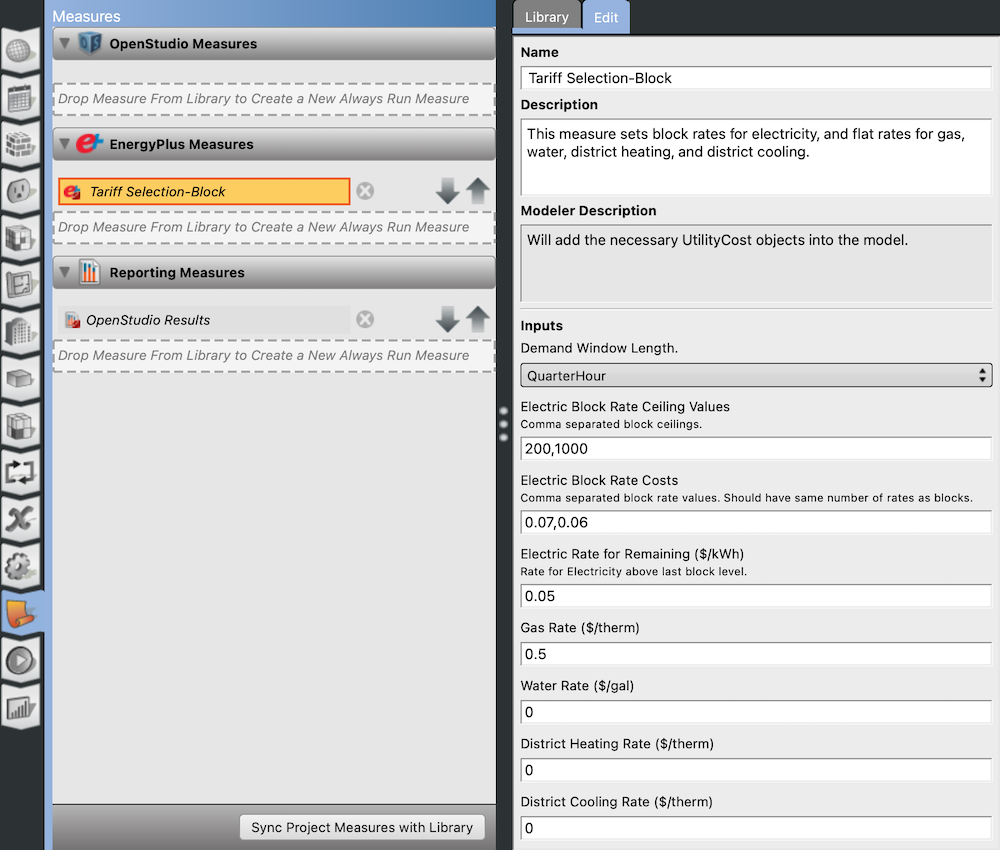
Only purchased electricity and natural gas rates here, e.g. no district heating/cooling or water rates:
Output meters
You’ll likely need to add meters (as per your run/eplusout.err warnings). I added 2 meters for the Warehouse:
OS:Output:Meter,
  {71658cd4-932a-4cd7-80bf-03ecded2de39}, !- Handle
  ElectricityPurchased:Facility,          !- Name
  hourly;                                 !- Reporting Frequency

OS:Output:Meter,
  {e5f67f71-9e14-4c0d-96ee-a3d162e7d919}, !- Handle
  NaturalGas:Facility,                    !- Name
  hourly;                                 !- Reporting Frequency
Meter names are important (see run/eplusout.mdd file). In the OpenStudio-generated run/in.idf, I get:
Output:Meter:MeterFileOnly,
  ElectricityPurchased:Facility,          !- Key Name
  hourly;                                 !- Reporting Frequency

Output:Meter:MeterFileOnly,
  NaturalGas:Facility,                    !- Key Name
  hourly;                                 !- Reporting Frequency
EnergyPlus Tariff Measure
Based on the EnergyPlus measure “Tariff Selection-Block” settings, I get 2x UtilityCost:Tariff objects in the generated run/in.idf:
UtilityCost:Tariff,
  Electricity Tariff,                     !- Name
  ElectricityPurchased:Facility,          !- Output Meter Name
  kWh,                                    !- Conversion Factor Choice
  …

UtilityCost:Tariff,
  Gas Tariff,                             !- Name
  NaturalGas:Facility,                    !- Output Meter Name
  Therm,                                  !- Conversion Factor Choice
  …
Note the exact match between the auto-generated UtilityCost:Tariff output meter names and the aforementioned user-added output meters (e.g. “ElectricityPurchased:Facility”, not “Electricity:Facility”). One can freely change the output meters in OpenStudio, but one can’t overwrite the outputs of an EnergyPlus measure while staying in the OpenStudio sandbox. Of course, this is not an issue if one is willing to edit the EnergyPlus Tariff measure itself (or rewrite one from scratch).
LCC
OpenStudio SDK (and consequently App) users have limited control over LCC settings:
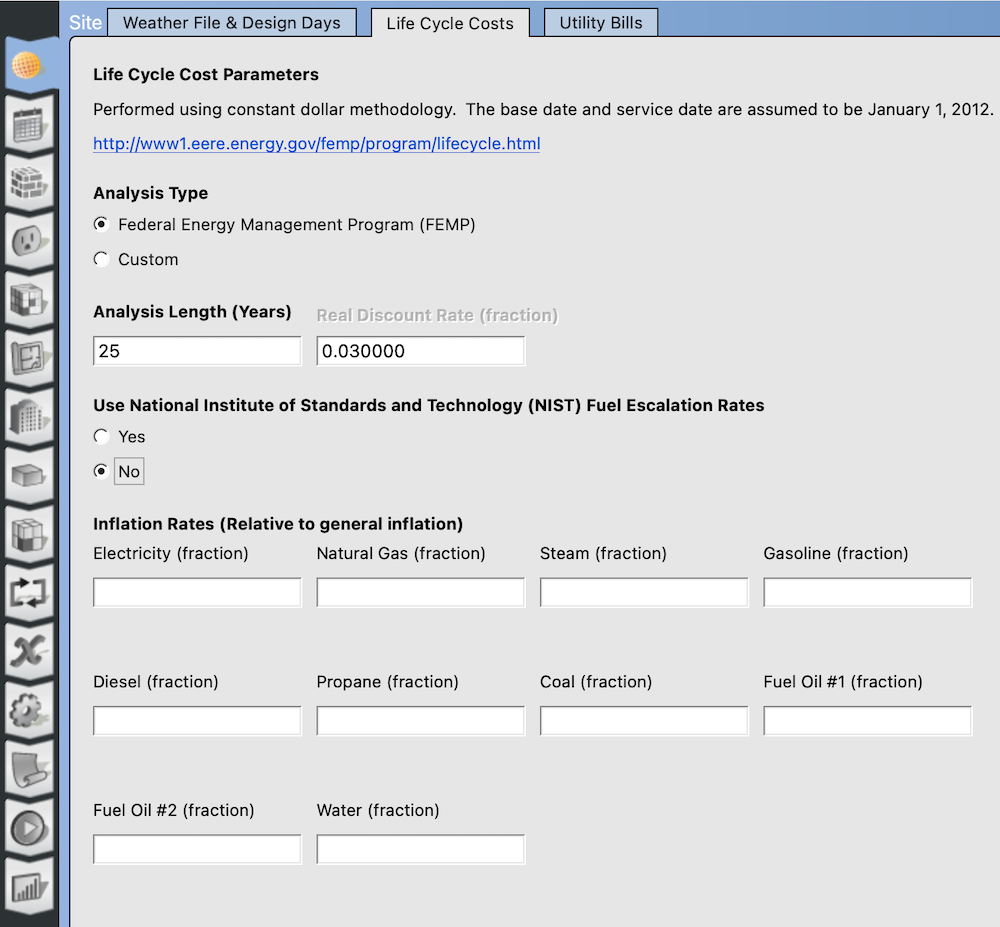
OpenStudio users can customize default discount and inflation rates, but not tweak price escalation objects - see discussion here. An excerpt of what is generated in the run/in.idf:
LifeCycleCost:UsePriceEscalation,
  U.S. Avg  Commercial-Electricity,       !- Name
  Electricity,                            !- Resource
  2011,                                   !- Escalation Start Year
  January,                                !- Escalation Start Month
  0.9838,                                 !- Year Escalation 1
  0.9730,                                 !- Year Escalation 2
  ...
Without changes, this will generate warnings in the run/eplusout.err file, such as:
* Warning * The resource referenced by LifeCycleCost:UsePriceEscalation= "U.S. AVG COMMERCIAL-ELECTRICITY" has no energy cost. * ~~~ * ... It is likely that the wrong resource is used. The resource should match the meter used in Utility:Tariff.
One can fix the in.idf directly with a text editor, by changing the “Resource” IDF entry: replace “Electricity” with “ElectricityPurchased” - see here. This harmonizes:
This, and a few other edits (like deleting monthly output tables), eliminated all run/eplusout.err warnings related to:
Cash Flow tables in the run/eplustbl.htm file seem fine. But as I’ve broken out of the OpenStudio sandbox, I can no longer rely on the OpenStudio Results Measure to show Cash Flow tables. If one insists on exposing Cash Flow tables using the OpenStudio Results Measure with the OpenStudio Application, my suggestion would be to develop a new EnergyPlus Tariff Measure. I’d take advantage of this new EnergyPlus measure to:
I haven’t done that. It may take a few iterations to nail it down. Can’t affirm this would finally fix the Cash Flow tables in the OpenStudio Results, but it would surely eliminate a bunch of recurring issues. I’d hopefully be closer to a solution.
Hope this helps.
| | 2 | No.2 Revision |
This is not a straight answer to your question. I simply ran a similar exercise on a variant of the US DOE Prototype Warehouse. Below are a few pointers and suggestions - SDK developers and/or more savy users may correct me …
Only purchased electricity and natural gas rates here, e.g. no district heating/cooling or water rates:
Output meters
You’ll likely need to add meters (as per your run/eplusout.err warnings). I added 2 meters for the Warehouse:
OS:Output:Meter,
  {71658cd4-932a-4cd7-80bf-03ecded2de39}, !- Handle
  ElectricityPurchased:Facility,          !- Name
  hourly;                                 !- Reporting Frequency

OS:Output:Meter,
  {e5f67f71-9e14-4c0d-96ee-a3d162e7d919}, !- Handle
  NaturalGas:Facility,                    !- Name
  hourly;                                 !- Reporting Frequency
Meter names are important (see run/eplusout.mdd file). In the OpenStudio-generated run/in.idf, I get:
Output:Meter:MeterFileOnly,
  ElectricityPurchased:Facility,          !- Key Name
  hourly;                                 !- Reporting Frequency

Output:Meter:MeterFileOnly,
  NaturalGas:Facility,                    !- Key Name
  hourly;                                 !- Reporting Frequency
EnergyPlus Tariff Measure
Based on the EnergyPlus measure “Tariff Selection-Block” settings, I get 2x UtilityCost:Tariff objects in the generated run/in.idf:
UtilityCost:Tariff,
  Electricity Tariff,                     !- Name
  ElectricityPurchased:Facility,          !- Output Meter Name
  kWh,                                    !- Conversion Factor Choice
  …

UtilityCost:Tariff,
  Gas Tariff,                             !- Name
  NaturalGas:Facility,                    !- Output Meter Name
  Therm,                                  !- Conversion Factor Choice
  …
Note the exact match between the auto-generated UtilityCost:Tariff output meter names and the aforementioned user-added output meters (e.g. “ElectricityPurchased:Facility”, not “Electricity:Facility”). One can freely change the output meters in OpenStudio, but one can’t overwrite the outputs of an EnergyPlus measure while staying in the OpenStudio sandbox. Of course, this is not an issue if one is willing to edit the EnergyPlus Tariff measure itself (or rewrite one from scratch).
LCC
OpenStudio SDK (and consequently App) users have limited control over LCC settings:
OpenStudio users can customize default discount and inflation rates, but not tweak price escalation objects - see discussion here. An excerpt of what is generated in the run/in.idf:run/in.idf:
LifeCycleCost:UsePriceEscalation,
  U.S. Avg  Commercial-Electricity,       !- Name
  Electricity,                            !- Resource
  2011,                                   !- Escalation Start Year
  January,                                !- Escalation Start Month
  0.9838,                                 !- Year Escalation 1
  0.9730,                                 !- Year Escalation 2
  ...
Without changes, this will generate warnings in the run/eplusout.err file, such as:
* Warning * The resource referenced by LifeCycleCost:UsePriceEscalation= "U.S. AVG COMMERCIAL-ELECTRICITY" has no energy cost. * ~~~ * ... It is likely that the wrong resource is used. The resource should match the meter used in Utility:Tariff.
One can fix the in.idf directly with a text editor, by changing the “Resource” IDF entry: replace “Electricity” with “ElectricityPurchased” - see here. This harmonizes:
This, and a few other edits (like deleting monthly output tables), eliminated all run/eplusout.err warnings related to:
Cash Flow tables in the run/eplustbl.htm file seem fine. But as I’ve broken out of the OpenStudio sandbox, I can no longer rely on the OpenStudio Results Measure to show Cash Flow tables. If one insists on exposing Cash Flow tables using the OpenStudio Results Measure with the OpenStudio Application, my suggestion would be to develop a new EnergyPlus Tariff Measure. I’d take advantage of this new EnergyPlus measure to:
I haven’t done that. It may take a few iterations to nail it down. Can’t affirm this would finally fix the missing Cash Flow tables in the OpenStudio Results, but it would surely eliminate a bunch of recurring issues. irritants. I’d hopefully be closer to a solution.
Hope this helps.


