
Question-and-Answer Resource for the Building Energy Modeling Community
 | 1 | initial version |
Below is a basic Ruby script that merges the geometry of 2x OSMs:
Both models should be downloaded to the same folder as the script.
require "openstudio"

translator = OpenStudio::OSVersion::VersionTranslator.new
model = OpenStudio::Model::Model.new

fileA = File.join(__dir__, "warehouse.osm")
pathA = OpenStudio::Path.new(fileA)
modlA = translator.loadModel(pathA).get

fileB = File.join(__dir__, "smalloffice.osm")
pathB = OpenStudio::Path.new(fileB)
modlB = translator.loadModel(pathB).get

[modlA, modlB].each_with_index do |modl, i|
  modl.getSpaces.each do |sp|
    space = OpenStudio::Model::Space.new(model)
    space.setDirectionofRelativeNorth(sp.directionofRelativeNorth)

    if i.zero?
      space.setXOrigin(sp.xOrigin)
      space.setYOrigin(sp.yOrigin)
      space.setZOrigin(sp.zOrigin)
    else
      space.setXOrigin(sp.xOrigin + 100)
      space.setYOrigin(sp.yOrigin)
      space.setZOrigin(sp.zOrigin)
    end

    sp.surfaces.each do |srf|
      surface = OpenStudio::Model::Surface.new(srf.vertices, model)
      surface.setSpace(space)
      surface.setOutsideBoundaryCondition(srf.outsideBoundaryCondition)
      surface.setSurfaceType(srf.surfaceType)
      surface.setSunExposure(srf.sunExposure)
      surface.setWindExposure(srf.windExposure)

      srf.subSurfaces.each do |sb|
        sub = OpenStudio::Model::SubSurface.new(sb.vertices, model)
        sub.setSurface(surface)
        sub.setSubSurfaceType(sb.subSurfaceType)
      end
    end

    zone = OpenStudio::Model::ThermalZone.new(model)
    space.setThermalZone(zone)

    sys = OpenStudio::Model::ZoneHVACIdealLoadsAirSystem.new(model)
    sys.addToThermalZone(zone)
  end
end

spaces = OpenStudio::Model::SpaceVector.new(model.getSpaces)
OpenStudio::Model.intersectSurfaces(spaces)
OpenStudio::Model.matchSurfaces(spaces)

file = File.join(__dir__, "final.osm")
model.save(file, true)
Running the script generates a "final.osm".
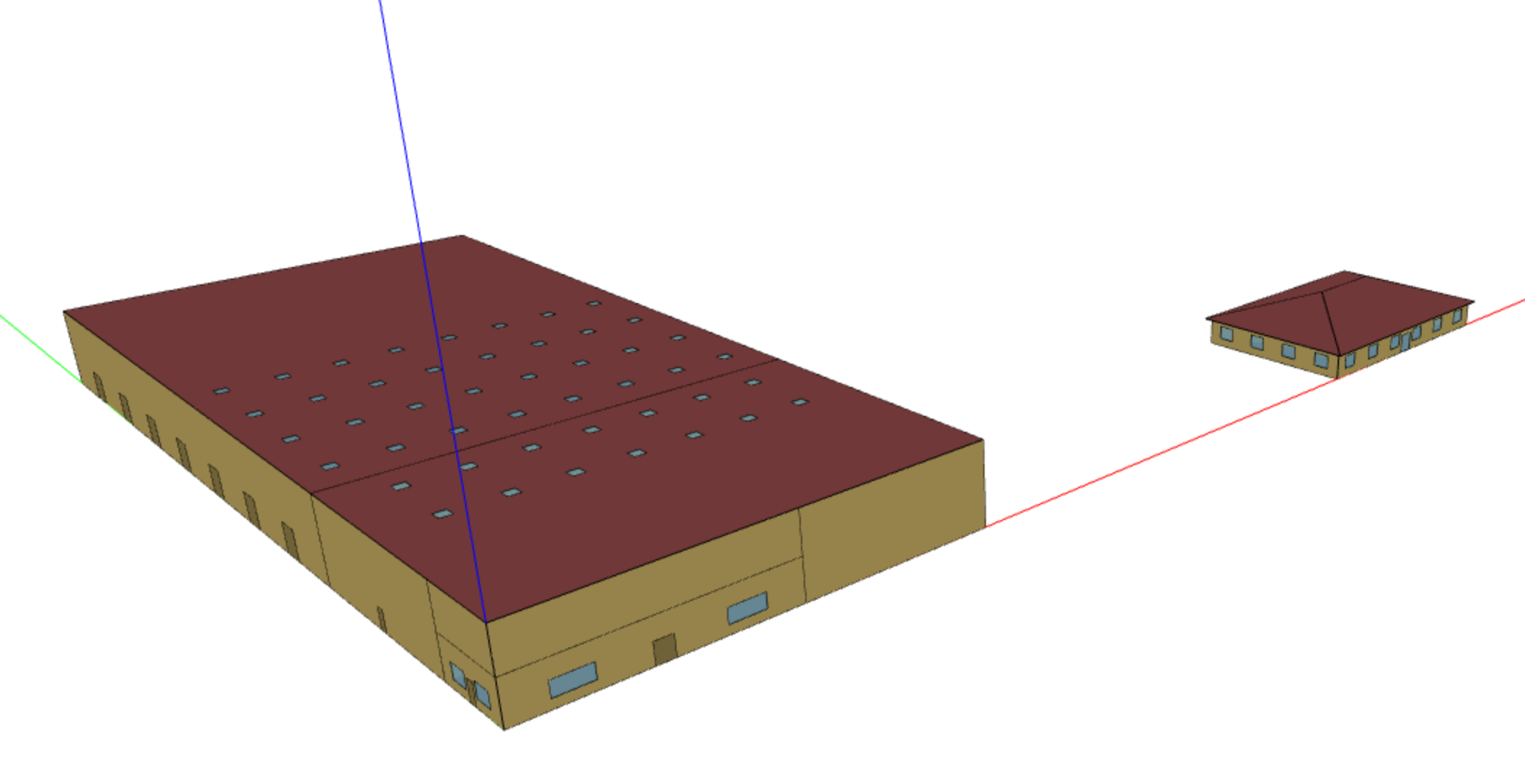
No errors running a test simulation using the App. You do need to first assign a (complete) default construction set to the building to actually run a test simulation. You can adapt the script to your needs (e.g. use your own OSMs). If needed, you can email me the (zipped) OSMs - I'll merge the zipped OSMs using the very same script.
The script is just a demo. You can further develop the script so it copies/pastes other items (e.g. loads, schedules). I also suggest going over past related UMH posts (such as this one) - plenty of caveats to consider when dealing with an OSM holding multiple pavilions (e.g. separate meters, shared plant/systems).


